All posts

How to Create a Coaching Plan from Assessment Results in Under 10 Minutes

Author
Dariia Komarova
Created on
July 22, 2026

The Development Plan and Team Coaching Guide is a free Deeper Signals AI Skill that turns assessment results into a structured coaching plan. You give it a person's role, their context, and their assessment results. It returns a development plan a coach can prepare and run sessions from. The plan includes development priorities, coaching questions, on-the-job activities, and a session-by-session arc. It prepares in minutes the groundwork that can otherwise take a practitioner several hours.

This guide walks through how the skill works, how to use it, and how to read the output.

Why turning assessment results into a coaching plan is hard

An assessment report shows a coach how someone tends to work. It rarely tells the coach what to do next. That gap is where the preparation time goes.

Before the first session, a practitioner has to decide which development priorities matter most. They connect those priorities to the person's role, design practical activities, and plan the coaching itself. That means sequencing what to cover, what the person should practice between sessions, and how progress gets reviewed.

The work is even heavier when the plan has to be specific to the individual rather than pulled from a generic template. This skill is designed to prepare that groundwork.

What the Development Plan and Team Coaching Guide does

The skill runs in two modes. It can build an individual development and coaching plan, or a team coaching and facilitation guide. In this guide, we’ll take a closer look at how to create an individual plan.

The output is a working document for the coach or practitioner. It is not meant to be handed to the person as a final assessment report. Instead, it gives the coach a structured view of the profile, the development priorities, coaching questions, practical activities, and a full session plan.

How to create a coaching plan in under 10 minutes

Here is the full walkthrough, using a fictional manager named Vikram Casey.

Step 1 — Enter the basic context. Open Claude/ChatGPT with the Deeper Signals skill installed. You can find a guide for installing skills here. Call the skill in a new chat and ask it to create an individual development plan for Vikram Casey. Then, enter basic information about Vikram. For example, Vikram is a Digital Marketing Manager at the manager level, working in the marketing function. Set the time period the plan covers, for example, 90 days.

Step 2 — Upload the assessment results. Add Vikram's assessment results to the conversation. This example uses only a few inputs. You can add more when you have it, including development goals, organizational priorities, role history, manager feedback, current challenges, or the reason coaching is taking place. Richer context produces a more targeted plan.

Step 3 — Confirm and let it build. The skill reviews the information and may ask a few follow-up questions. Once the inputs are confirmed, it starts building.

A few moments later, the document with a 90-day development plan for Vikram is ready.

How to read the output like a practitioner

The finished plan opens by explaining how it should be used. The next section summarizes the coaching research behind the plan.

Then comes the profile summary. It separates "what the profile shows" from "what we infer." The assessment might show that Vikram is highly flexible, candid, and reserved. The report then offers interpretations for the coach to test, such as whether his direct and quiet style is sometimes experienced as distant. That interpretation is framed as something to explore.

Two development priorities are then built out in detail. In this example, the first pairs Vikram's speed and agility with more dependable follow-through. The second keeps his direct style while making his warmth and positive intent more visible to the team.

Each priority comes with a goal, coaching questions, likely blockers, on-the-job activities, and observable signs of progress. The activities are behavioral rather than generic.

Finally, the report turns the priorities into a four-session coaching arc. It starts with contracting and building the working relationship. It moves through awareness and behavioral experiments, then ends with consolidation and sustaining new habits. There are clear roles for the coach and manager, with review points at 30, 60, and 90 days.

What the skill can and can't do

The plan is AI-generated from the information and assessment data you provide. It is built to support coaching and development planning. It is not a definitive evaluation of the individual.

The coach, manager, or practitioner stays responsible for the judgment calls. That means testing interpretations with the person, applying professional expertise, and making sure the plan is used fairly, lawfully, and appropriately. The skill prepares the groundwork, but the practitioner still owns the coaching.

How Deeper Signals approaches AI-supported coaching

Deeper Signals builds on evidence that personality can change through targeted intervention (Roberts et al., 2017). That principle shapes how we turn assessment results into practical development activity. Dynamo Learning applies it by translating assessment insights into personalized behavioural goals, coaching prompts, and evidence-based development activities that help people build new habits over time.

The same principle underpins this skill. A profile from an assessment, such as the Core Drivers, is treated as a set of testable hypotheses, then translated into specific behavioral activities and coaching priorities. This gives the coach something concrete to work with in each session, while keeping interpretation and judgment firmly in the practitioner’s hands.

The Development Plan and Team Coaching Guide is part of the free Deeper Signals AI Skills toolbox. The “How to get started” guide is available through the link below.

FAQ

Is the coaching plan meant to be given to the person being coached?

No. It is a working document for the coach or practitioner, not a final report to hand over.

Do I need a full assessment to use it?

No, but more context helps. Even a few inputs work, and adding goals, role history, or manager feedback produces a more targeted plan.

Can it build plans for a whole team?

Yes. The skill has a second mode that creates a team coaching and facilitation guide built around team context and assessment results.

Does AI replace the coach?

No. The skill prepares the groundwork, and the coach remains responsible for testing interpretations and running the sessions.

How long does it take?

Most individual plans are ready in under ten minutes, compared with the several hours manual preparation can take.

All posts

How to Create a Coaching Plan from Assessment Results in Under 10 Minutes

Author
Dariia Komarova
Created on
July 15, 2026

The Development Plan and Team Coaching Guide is a free Deeper Signals AI Skill that turns assessment results into a structured coaching plan. You give it a person's role, their context, and their assessment results. It returns a development plan a coach can prepare and run sessions from. The plan includes development priorities, coaching questions, on-the-job activities, and a session-by-session arc. It prepares in minutes the groundwork that can otherwise take a practitioner several hours.

This guide walks through how the skill works, how to use it, and how to read the output.

Why turning assessment results into a coaching plan is hard

An assessment report shows a coach how someone tends to work. It rarely tells the coach what to do next. That gap is where the preparation time goes.

Before the first session, a practitioner has to decide which development priorities matter most. They connect those priorities to the person's role, design practical activities, and plan the coaching itself. That means sequencing what to cover, what the person should practice between sessions, and how progress gets reviewed.

The work is even heavier when the plan has to be specific to the individual rather than pulled from a generic template. This skill is designed to prepare that groundwork.

What the Development Plan and Team Coaching Guide does

The skill runs in two modes. It can build an individual development and coaching plan, or a team coaching and facilitation guide. In this guide, we’ll take a closer look at how to create an individual plan.

The output is a working document for the coach or practitioner. It is not meant to be handed to the person as a final assessment report. Instead, it gives the coach a structured view of the profile, the development priorities, coaching questions, practical activities, and a full session plan.

How to create a coaching plan in under 10 minutes

Here is the full walkthrough, using a fictional manager named Vikram Casey.

Step 1 — Enter the basic context. Open Claude/ChatGPT with the Deeper Signals skill installed. You can find a guide for installing skills here. Call the skill in a new chat and ask it to create an individual development plan for Vikram Casey. Then, enter basic information about Vikram. For example, Vikram is a Digital Marketing Manager at the manager level, working in the marketing function. Set the time period the plan covers, for example, 90 days.
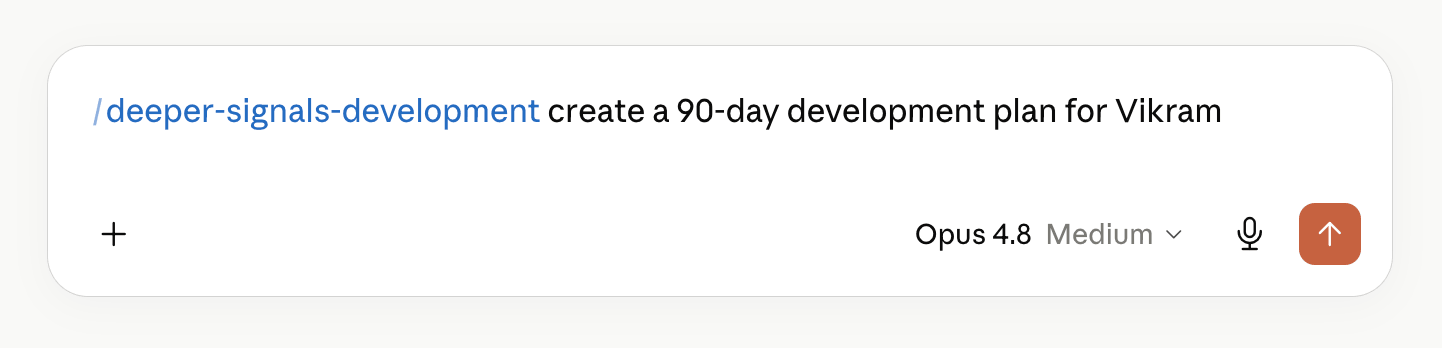
Step 2 — Upload the assessment results. Add Vikram's assessment results to the conversation. This example uses only a few inputs. You can add more when you have it, including development goals, organizational priorities, role history, manager feedback, current challenges, or the reason coaching is taking place. Richer context produces a more targeted plan.

Step 3 — Confirm and let it build. The skill reviews the information and may ask a few follow-up questions. Once the inputs are confirmed, it starts building.

A few moments later, the document with a 90-day development plan for Vikram is ready.

How to read the output like a practitioner

The finished plan opens by explaining how it should be used. The next section summarizes the coaching research behind the plan.

Then comes the profile summary. It separates "what the profile shows" from "what we infer." The assessment might show that Vikram is highly flexible, candid, and reserved. The report then offers interpretations for the coach to test, such as whether his direct and quiet style is sometimes experienced as distant. That interpretation is framed as something to explore.

Two development priorities are then built out in detail. In this example, the first pairs Vikram's speed and agility with more dependable follow-through. The second keeps his direct style while making his warmth and positive intent more visible to the team.

Each priority comes with a goal, coaching questions, likely blockers, on-the-job activities, and observable signs of progress. The activities are behavioral rather than generic.

Finally, the report turns the priorities into a four-session coaching arc. It starts with contracting and building the working relationship. It moves through awareness and behavioral experiments, then ends with consolidation and sustaining new habits. There are clear roles for the coach and manager, with review points at 30, 60, and 90 days.

What the skill can and can't do

The plan is AI-generated from the information and assessment data you provide. It is built to support coaching and development planning. It is not a definitive evaluation of the individual.

The coach, manager, or practitioner stays responsible for the judgment calls. That means testing interpretations with the person, applying professional expertise, and making sure the plan is used fairly, lawfully, and appropriately. The skill prepares the groundwork, but the practitioner still owns the coaching.

How Deeper Signals approaches AI-supported coaching

Deeper Signals builds on evidence that personality can change through targeted intervention (Roberts et al., 2017). That principle shapes how we turn assessment results into practical development activity. Dynamo Learning applies it by translating assessment insights into personalized behavioural goals, coaching prompts, and evidence-based development activities that help people build new habits over time.

The same principle underpins this skill. A profile from an assessment, such as the Core Drivers, is treated as a set of testable hypotheses, then translated into specific behavioral activities and coaching priorities. This gives the coach something concrete to work with in each session, while keeping interpretation and judgment firmly in the practitioner’s hands.

The Development Plan and Team Coaching Guide is part of the free Deeper Signals AI Skills toolbox. The “How to get started” guide is available through the link below.

FAQ

Is the coaching plan meant to be given to the person being coached?

No. It is a working document for the coach or practitioner, not a final report to hand over.

Do I need a full assessment to use it?

No, but more context helps. Even a few inputs work, and adding goals, role history, or manager feedback produces a more targeted plan.

Can it build plans for a whole team?

Yes. The skill has a second mode that creates a team coaching and facilitation guide built around team context and assessment results.

Does AI replace the coach?

No. The skill prepares the groundwork, and the coach remains responsible for testing interpretations and running the sessions.

How long does it take?

Most individual plans are ready in under ten minutes, compared with the several hours manual preparation can take.

All posts

How to Create a Coaching Plan from Assessment Results in Under 10 Minutes

Author
Dariia Komarova
Created on
July 22, 2026

The Development Plan and Team Coaching Guide is a free Deeper Signals AI Skill that turns assessment results into a structured coaching plan. You give it a person's role, their context, and their assessment results. It returns a development plan a coach can prepare and run sessions from. The plan includes development priorities, coaching questions, on-the-job activities, and a session-by-session arc. It prepares in minutes the groundwork that can otherwise take a practitioner several hours.

This guide walks through how the skill works, how to use it, and how to read the output.

Why turning assessment results into a coaching plan is hard

An assessment report shows a coach how someone tends to work. It rarely tells the coach what to do next. That gap is where the preparation time goes.

Before the first session, a practitioner has to decide which development priorities matter most. They connect those priorities to the person's role, design practical activities, and plan the coaching itself. That means sequencing what to cover, what the person should practice between sessions, and how progress gets reviewed.

The work is even heavier when the plan has to be specific to the individual rather than pulled from a generic template. This skill is designed to prepare that groundwork.

What the Development Plan and Team Coaching Guide does

The skill runs in two modes. It can build an individual development and coaching plan, or a team coaching and facilitation guide. In this guide, we’ll take a closer look at how to create an individual plan.

The output is a working document for the coach or practitioner. It is not meant to be handed to the person as a final assessment report. Instead, it gives the coach a structured view of the profile, the development priorities, coaching questions, practical activities, and a full session plan.

How to create a coaching plan in under 10 minutes

Here is the full walkthrough, using a fictional manager named Vikram Casey.

Step 1 — Enter the basic context. Open Claude/ChatGPT with the Deeper Signals skill installed. You can find a guide for installing skills here. Call the skill in a new chat and ask it to create an individual development plan for Vikram Casey. Then, enter basic information about Vikram. For example, Vikram is a Digital Marketing Manager at the manager level, working in the marketing function. Set the time period the plan covers, for example, 90 days.

Step 2 — Upload the assessment results. Add Vikram's assessment results to the conversation. This example uses only a few inputs. You can add more when you have it, including development goals, organizational priorities, role history, manager feedback, current challenges, or the reason coaching is taking place. Richer context produces a more targeted plan.

Step 3 — Confirm and let it build. The skill reviews the information and may ask a few follow-up questions. Once the inputs are confirmed, it starts building.

A few moments later, the document with a 90-day development plan for Vikram is ready.

How to read the output like a practitioner

The finished plan opens by explaining how it should be used. The next section summarizes the coaching research behind the plan.

Then comes the profile summary. It separates "what the profile shows" from "what we infer." The assessment might show that Vikram is highly flexible, candid, and reserved. The report then offers interpretations for the coach to test, such as whether his direct and quiet style is sometimes experienced as distant. That interpretation is framed as something to explore.

Two development priorities are then built out in detail. In this example, the first pairs Vikram's speed and agility with more dependable follow-through. The second keeps his direct style while making his warmth and positive intent more visible to the team.

Each priority comes with a goal, coaching questions, likely blockers, on-the-job activities, and observable signs of progress. The activities are behavioral rather than generic.

Finally, the report turns the priorities into a four-session coaching arc. It starts with contracting and building the working relationship. It moves through awareness and behavioral experiments, then ends with consolidation and sustaining new habits. There are clear roles for the coach and manager, with review points at 30, 60, and 90 days.

What the skill can and can't do

The plan is AI-generated from the information and assessment data you provide. It is built to support coaching and development planning. It is not a definitive evaluation of the individual.

The coach, manager, or practitioner stays responsible for the judgment calls. That means testing interpretations with the person, applying professional expertise, and making sure the plan is used fairly, lawfully, and appropriately. The skill prepares the groundwork, but the practitioner still owns the coaching.

How Deeper Signals approaches AI-supported coaching

Deeper Signals builds on evidence that personality can change through targeted intervention (Roberts et al., 2017). That principle shapes how we turn assessment results into practical development activity. Dynamo Learning applies it by translating assessment insights into personalized behavioural goals, coaching prompts, and evidence-based development activities that help people build new habits over time.

The same principle underpins this skill. A profile from an assessment, such as the Core Drivers, is treated as a set of testable hypotheses, then translated into specific behavioral activities and coaching priorities. This gives the coach something concrete to work with in each session, while keeping interpretation and judgment firmly in the practitioner’s hands.

The Development Plan and Team Coaching Guide is part of the free Deeper Signals AI Skills toolbox. The “How to get started” guide is available through the link below.

FAQ

Is the coaching plan meant to be given to the person being coached?

No. It is a working document for the coach or practitioner, not a final report to hand over.

Do I need a full assessment to use it?

No, but more context helps. Even a few inputs work, and adding goals, role history, or manager feedback produces a more targeted plan.

Can it build plans for a whole team?

Yes. The skill has a second mode that creates a team coaching and facilitation guide built around team context and assessment results.

Does AI replace the coach?

No. The skill prepares the groundwork, and the coach remains responsible for testing interpretations and running the sessions.

How long does it take?

Most individual plans are ready in under ten minutes, compared with the several hours manual preparation can take.

All posts

How to Create a Coaching Plan from Assessment Results in Under 10 Minutes

Author
Dariia Komarova
Created on
July 22, 2026

The Development Plan and Team Coaching Guide is a free Deeper Signals AI Skill that turns assessment results into a structured coaching plan. You give it a person's role, their context, and their assessment results. It returns a development plan a coach can prepare and run sessions from. The plan includes development priorities, coaching questions, on-the-job activities, and a session-by-session arc. It prepares in minutes the groundwork that can otherwise take a practitioner several hours.

This guide walks through how the skill works, how to use it, and how to read the output.

Why turning assessment results into a coaching plan is hard

An assessment report shows a coach how someone tends to work. It rarely tells the coach what to do next. That gap is where the preparation time goes.

Before the first session, a practitioner has to decide which development priorities matter most. They connect those priorities to the person's role, design practical activities, and plan the coaching itself. That means sequencing what to cover, what the person should practice between sessions, and how progress gets reviewed.

The work is even heavier when the plan has to be specific to the individual rather than pulled from a generic template. This skill is designed to prepare that groundwork.

What the Development Plan and Team Coaching Guide does

The skill runs in two modes. It can build an individual development and coaching plan, or a team coaching and facilitation guide. In this guide, we’ll take a closer look at how to create an individual plan.

The output is a working document for the coach or practitioner. It is not meant to be handed to the person as a final assessment report. Instead, it gives the coach a structured view of the profile, the development priorities, coaching questions, practical activities, and a full session plan.

How to create a coaching plan in under 10 minutes

Here is the full walkthrough, using a fictional manager named Vikram Casey.

Step 1 — Enter the basic context. Open Claude/ChatGPT with the Deeper Signals skill installed. You can find a guide for installing skills here. Call the skill in a new chat and ask it to create an individual development plan for Vikram Casey. Then, enter basic information about Vikram. For example, Vikram is a Digital Marketing Manager at the manager level, working in the marketing function. Set the time period the plan covers, for example, 90 days.

Step 2 — Upload the assessment results. Add Vikram's assessment results to the conversation. This example uses only a few inputs. You can add more when you have it, including development goals, organizational priorities, role history, manager feedback, current challenges, or the reason coaching is taking place. Richer context produces a more targeted plan.

Step 3 — Confirm and let it build. The skill reviews the information and may ask a few follow-up questions. Once the inputs are confirmed, it starts building.

A few moments later, the document with a 90-day development plan for Vikram is ready.

How to read the output like a practitioner

The finished plan opens by explaining how it should be used. The next section summarizes the coaching research behind the plan.

Then comes the profile summary. It separates "what the profile shows" from "what we infer." The assessment might show that Vikram is highly flexible, candid, and reserved. The report then offers interpretations for the coach to test, such as whether his direct and quiet style is sometimes experienced as distant. That interpretation is framed as something to explore.

Two development priorities are then built out in detail. In this example, the first pairs Vikram's speed and agility with more dependable follow-through. The second keeps his direct style while making his warmth and positive intent more visible to the team.

Each priority comes with a goal, coaching questions, likely blockers, on-the-job activities, and observable signs of progress. The activities are behavioral rather than generic.

Finally, the report turns the priorities into a four-session coaching arc. It starts with contracting and building the working relationship. It moves through awareness and behavioral experiments, then ends with consolidation and sustaining new habits. There are clear roles for the coach and manager, with review points at 30, 60, and 90 days.

What the skill can and can't do

The plan is AI-generated from the information and assessment data you provide. It is built to support coaching and development planning. It is not a definitive evaluation of the individual.

The coach, manager, or practitioner stays responsible for the judgment calls. That means testing interpretations with the person, applying professional expertise, and making sure the plan is used fairly, lawfully, and appropriately. The skill prepares the groundwork, but the practitioner still owns the coaching.

How Deeper Signals approaches AI-supported coaching

Deeper Signals builds on evidence that personality can change through targeted intervention (Roberts et al., 2017). That principle shapes how we turn assessment results into practical development activity. Dynamo Learning applies it by translating assessment insights into personalized behavioural goals, coaching prompts, and evidence-based development activities that help people build new habits over time.

The same principle underpins this skill. A profile from an assessment, such as the Core Drivers, is treated as a set of testable hypotheses, then translated into specific behavioral activities and coaching priorities. This gives the coach something concrete to work with in each session, while keeping interpretation and judgment firmly in the practitioner’s hands.

The Development Plan and Team Coaching Guide is part of the free Deeper Signals AI Skills toolbox. The “How to get started” guide is available through the link below.

FAQ

Is the coaching plan meant to be given to the person being coached?

No. It is a working document for the coach or practitioner, not a final report to hand over.

Do I need a full assessment to use it?

No, but more context helps. Even a few inputs work, and adding goals, role history, or manager feedback produces a more targeted plan.

Can it build plans for a whole team?

Yes. The skill has a second mode that creates a team coaching and facilitation guide built around team context and assessment results.

Does AI replace the coach?

No. The skill prepares the groundwork, and the coach remains responsible for testing interpretations and running the sessions.

How long does it take?

Most individual plans are ready in under ten minutes, compared with the several hours manual preparation can take.

All posts

How to Create a Coaching Plan from Assessment Results in Under 10 Minutes

Customer
Job Title

The Development Plan and Team Coaching Guide is a free Deeper Signals AI Skill that turns assessment results into a structured coaching plan. You give it a person's role, their context, and their assessment results. It returns a development plan a coach can prepare and run sessions from. The plan includes development priorities, coaching questions, on-the-job activities, and a session-by-session arc. It prepares in minutes the groundwork that can otherwise take a practitioner several hours.

This guide walks through how the skill works, how to use it, and how to read the output.

Why turning assessment results into a coaching plan is hard

An assessment report shows a coach how someone tends to work. It rarely tells the coach what to do next. That gap is where the preparation time goes.

Before the first session, a practitioner has to decide which development priorities matter most. They connect those priorities to the person's role, design practical activities, and plan the coaching itself. That means sequencing what to cover, what the person should practice between sessions, and how progress gets reviewed.

The work is even heavier when the plan has to be specific to the individual rather than pulled from a generic template. This skill is designed to prepare that groundwork.

What the Development Plan and Team Coaching Guide does

The skill runs in two modes. It can build an individual development and coaching plan, or a team coaching and facilitation guide. In this guide, we’ll take a closer look at how to create an individual plan.

The output is a working document for the coach or practitioner. It is not meant to be handed to the person as a final assessment report. Instead, it gives the coach a structured view of the profile, the development priorities, coaching questions, practical activities, and a full session plan.

How to create a coaching plan in under 10 minutes

Here is the full walkthrough, using a fictional manager named Vikram Casey.

Step 1 — Enter the basic context. Open Claude/ChatGPT with the Deeper Signals skill installed. You can find a guide for installing skills here. Call the skill in a new chat and ask it to create an individual development plan for Vikram Casey. Then, enter basic information about Vikram. For example, Vikram is a Digital Marketing Manager at the manager level, working in the marketing function. Set the time period the plan covers, for example, 90 days.

Step 2 — Upload the assessment results. Add Vikram's assessment results to the conversation. This example uses only a few inputs. You can add more when you have it, including development goals, organizational priorities, role history, manager feedback, current challenges, or the reason coaching is taking place. Richer context produces a more targeted plan.

Step 3 — Confirm and let it build. The skill reviews the information and may ask a few follow-up questions. Once the inputs are confirmed, it starts building.

A few moments later, the document with a 90-day development plan for Vikram is ready.

How to read the output like a practitioner

The finished plan opens by explaining how it should be used. The next section summarizes the coaching research behind the plan.

Then comes the profile summary. It separates "what the profile shows" from "what we infer." The assessment might show that Vikram is highly flexible, candid, and reserved. The report then offers interpretations for the coach to test, such as whether his direct and quiet style is sometimes experienced as distant. That interpretation is framed as something to explore.

Two development priorities are then built out in detail. In this example, the first pairs Vikram's speed and agility with more dependable follow-through. The second keeps his direct style while making his warmth and positive intent more visible to the team.

Each priority comes with a goal, coaching questions, likely blockers, on-the-job activities, and observable signs of progress. The activities are behavioral rather than generic.

Finally, the report turns the priorities into a four-session coaching arc. It starts with contracting and building the working relationship. It moves through awareness and behavioral experiments, then ends with consolidation and sustaining new habits. There are clear roles for the coach and manager, with review points at 30, 60, and 90 days.

What the skill can and can't do

The plan is AI-generated from the information and assessment data you provide. It is built to support coaching and development planning. It is not a definitive evaluation of the individual.

The coach, manager, or practitioner stays responsible for the judgment calls. That means testing interpretations with the person, applying professional expertise, and making sure the plan is used fairly, lawfully, and appropriately. The skill prepares the groundwork, but the practitioner still owns the coaching.

How Deeper Signals approaches AI-supported coaching

Deeper Signals builds on evidence that personality can change through targeted intervention (Roberts et al., 2017). That principle shapes how we turn assessment results into practical development activity. Dynamo Learning applies it by translating assessment insights into personalized behavioural goals, coaching prompts, and evidence-based development activities that help people build new habits over time.

The same principle underpins this skill. A profile from an assessment, such as the Core Drivers, is treated as a set of testable hypotheses, then translated into specific behavioral activities and coaching priorities. This gives the coach something concrete to work with in each session, while keeping interpretation and judgment firmly in the practitioner’s hands.

The Development Plan and Team Coaching Guide is part of the free Deeper Signals AI Skills toolbox. The “How to get started” guide is available through the link below.

FAQ

Is the coaching plan meant to be given to the person being coached?

No. It is a working document for the coach or practitioner, not a final report to hand over.

Do I need a full assessment to use it?

No, but more context helps. Even a few inputs work, and adding goals, role history, or manager feedback produces a more targeted plan.

Can it build plans for a whole team?

Yes. The skill has a second mode that creates a team coaching and facilitation guide built around team context and assessment results.

Does AI replace the coach?

No. The skill prepares the groundwork, and the coach remains responsible for testing interpretations and running the sessions.

How long does it take?

Most individual plans are ready in under ten minutes, compared with the several hours manual preparation can take.

Ready for your Spotlight?
Contact us to book your Customer Spotlight and showcase your work to an extensive, global audience!
Start your free trial today
Free access to Deeper Signals’ quick, scientific assessments, feedback tools, and more.
Start Free Trial
Recent posts
Guides & Tips
How to Turn Executive Assessment Data into a Leadership Narrative with an AI Skill
Psychometrics, 360s, interviews, references — this free Deeper Signals skill codes it all against a role's success criteria into an auditable leadership narrative.
Read more
Guides & Tips
How to Review an Assessment's Evidence Base with an AI Skill
How well is that assessment actually evidenced? This free Deeper Signals AI skill maps any instrument against the APA, SIOP, EFPA, and ITC standards.
Read more
Guides & Tips
How to Create a Coaching Plan from Assessment Results in Under 10 Minutes
Learn how Deeper Signals' free Development Plan skill turns assessment results into a coach-ready plan in under 10 minutes.
Read more
Guides & Tips
How to Build a Finance-Ready Business Case with the Assessment ROI Calculator
See how Deeper Signals' free Assessment ROI Calculator turns a few workforce data points into a finance-ready business case for assessment investment.
Read more
Guides & Tips
How to Install the Deeper Signals AI Skills
Install all four Deeper Signals AI skills in about two minutes. This step-by-step guide, with screenshots, shows you how to set them up and use them in any chat.
Read more
Want more articles like this?
Subscribe to our newsletter
Practical insights on people and performance, delivered to your inbox
Subscribe
Recent posts
Guides & Tips
How to Turn Executive Assessment Data into a Leadership Narrative with an AI Skill
Psychometrics, 360s, interviews, references — this free Deeper Signals skill codes it all against a role's success criteria into an auditable leadership narrative.
Read more
Guides & Tips
How to Review an Assessment's Evidence Base with an AI Skill
How well is that assessment actually evidenced? This free Deeper Signals AI skill maps any instrument against the APA, SIOP, EFPA, and ITC standards.
Read more
Guides & Tips
How to Create a Coaching Plan from Assessment Results in Under 10 Minutes
Learn how Deeper Signals' free Development Plan skill turns assessment results into a coach-ready plan in under 10 minutes.
Read more
Guides & Tips
How to Build a Finance-Ready Business Case with the Assessment ROI Calculator
See how Deeper Signals' free Assessment ROI Calculator turns a few workforce data points into a finance-ready business case for assessment investment.
Read more
Guides & Tips
How to Install the Deeper Signals AI Skills
Install all four Deeper Signals AI skills in about two minutes. This step-by-step guide, with screenshots, shows you how to set them up and use them in any chat.
Read more
Curious to learn more?

Schedule a call with Deeper Signals to understand how our assessments and feedback tools help people gain a deep awareness of their talents and reach their full potential. Underpinned by science and technology, we build talented people, leaders and companies.

  • Scalable and engaging assessment solutions
  • Measurable and predictive talent insights
  • Powered by technology and science that drives results
Let's talk!
  • Scalable interventions for growth
  • Measurable data, insights and outcomes for high performance
  • Proven scientific expertise that links results to outcomes
Thank you!
Would you like to schedule a meeting?
Please fill all fields before submitting the form.
All posts

Heading

Author
This is some text inside of a div block.
Created on
This is some text inside of a div block.

Heading 1

Heading 2

Heading 3

Heading 4

Heading 5
Heading 6

Lorem ipsum dolor sit amet, consectetur adipiscing elit, sed do eiusmod tempor incididunt ut labore et dolore magna aliqua. Ut enim ad minim veniam, quis nostrud exercitation ullamco laboris nisi ut aliquip ex ea commodo consequat. Duis aute irure dolor in reprehenderit in voluptate velit esse cillum dolore eu fugiat nulla pariatur.

Block quote

Ordered list

  1. Item 1
  2. Item 2
  3. Item 3

Unordered list

  • Item A
  • Item B
  • Item C

Text link

Bold text

Emphasis

Superscript

Subscript